Inductor finders:   Power   |   RF
Search our site:   

  Home   Design Tools | Samples | Kits | Price + Stock | Sales | Support | Jobs | Index
   
Power Magnetics Tools
RF Inductor Tools
CM Filter Finder Tool
IC / Inductor Match Tool
Other Tools
BACK
.

Model libraries for Linear Technology LTSpice (SwitcherCAD)*


SwitcherCAD™ III is a high performance Spice III simulator that simplifies the design of switching regulators. The software is provided free by Linear Technology at this web address:
http://www.linear.com/designtools/software/

SwitcherCAD III includes a library of models for a limited number of Coilcraft inductor models. This library file is called “CCI2005” and is updated periodically.

Coilcraft also offers a larger (1400+) and more current selection of SwitcherCAD III models that can be downloaded below. These are the most up-to-date versions and include models for many of our newest products, which are not in the file posted on the Linear Technology web site.

For convenience, the models are organized into smaller libraries that cover similar product families. Or you can download a single large file with all available models.

Using Coilcraft model libraries

Model construction

Library file for download

Right-click on the link below and save it to the SwitcherCAD III component library on your computer. The path is typically C:\Program Files\LTC\SwCADIII\lib\cmp.
 

CCI_All.ind

Includes all of the following models:


Chip inductors 0603PS, 0805PS, 1008PS, 1812PS, 0603LS, 0805LS, 1008LS, 1812LS


SM high current power inductors HCT, MLC, MVR, SER, SLC, XAL, XFL, XPL


SM low profile power inductors LPO, LPS


SM shielded power inductors DS, DT, DH, MOS, MSS


SM unshielded power inductors DO, ME, SD


Leaded RF and power inductors 132, DC1012, DR, PCH, PCV, RFB


Using Coilcraft model libraries

To access the desired Coilcraft library and leave the standard library as the default

Use SwCADIII* to create the schematic as you would like it.

Click on the “Open” icon on the tool bar, then click on the folder labeled “lib”, then the folder labeled “cmp”, then the desired “CCI xxxxx.ind” file. Minimize the opened library file.

Right-click on the inductor you want to modify. In the box that pops up, click on “Select Inductor” and pick the desired Coilcraft inductor. If it is not in this view, click on “Select All Inductors in Database”.

To automatically be asked which library to use

Go to “C:\Program Files\LTC\SwCADIII\lib\cmp”. Rename the standard library “standard.ind” to something else (LT standard.lib for example).

Use SwCADIII to create the schematic as you would like it.

Right-click on the inductor you want to modify. In the dialog box, click on “Select Inductor” to see the available component libraries, pick the one you want to use, then select the desired inductor model.

To make a Coilcraft library the default library

Go to “C:\Program Files\LTC\SwCADIII\lib\cmp”. Rename the standard library “standard.ind” to something else (LTC standard.lib for example). Rename the selected Coilcraft library “standard.ind”

Use SwCADIII* to create the schematic as you would like it.

When you right-click on the inductor, you will see a box that allows you to edit the inductor. Click on “Select Inductor” to open the list of Coilcraft models and select the one to use.

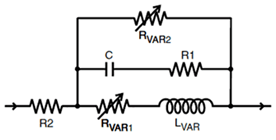
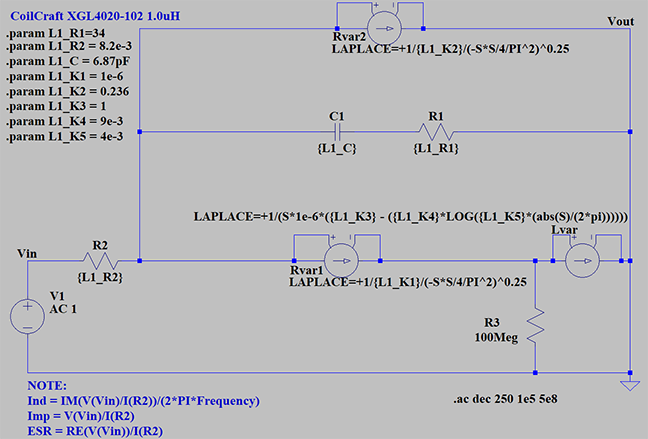
Model construction

The schematic below is the model structure used in SwitcherCAD III.


*SwitcherCAD, SwCAD and LTSpice are trademarked by Linear Technology Corporation

Home | Design Tools | Samples | Kits | Price + Stock | Sales | Support | Jobs | Index
Your comments and suggestions are welcome. Contact webmaster@coilcraft.com
Copyright © 2011, Coilcraft, Inc.   Privacy policy
Updated: May 08, 2013